Solutions · Retail
The rota, the opening list, the campaign brief — one app per store.
Weekly rotas assign from templates, opening-closing runs on checklists, campaign briefs reach every store at once; leave is managed from the phone.
Scenarios
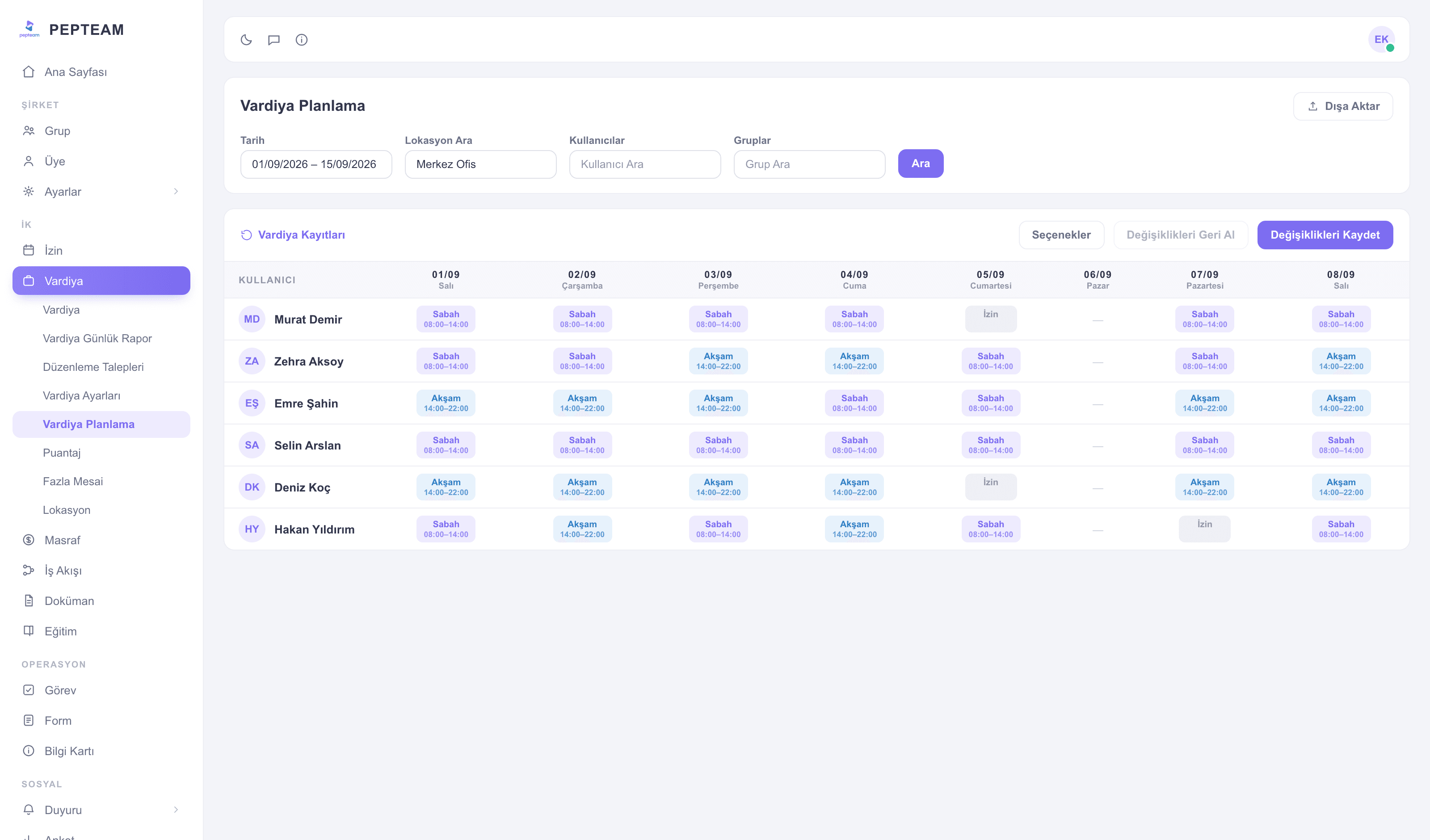
Rotas from templates
The weekday-weekend pattern lives in a template; the store manager opens the new week in a minute and the team sees the plan on their phones.
Opening and closing on a checklist
Till, shelves, security — opening and closing items are ticked on the list; a skipped item is visible from head office.
Campaigns hit every store at once
The new campaign brief goes to all stores in one announcement; reads are tracked on a list and the window changes everywhere the same day.
Leave traffic on one screen
Pre-holiday leave requests land on the manager's phone; approved leave flows into the rota automatically.
Modules used in this field
Frequently asked questions
Your choice: grant store managers planning rights, or let head office assign every store from one panel.
Assign the content to all store groups with the Training module; completion is tracked store by store.
Clock-ins flow into timesheets on their own; part-time hours are ready at month end.
The record lands at whichever store the clock-in was given; the person's month reports per store.